
Note: This post contains affiliate links. If you purchase through these links, I may earn a small commission at no extra cost to you. I only recommend tools I actually use. Please read my full disclaimer here for more information.
Building the right digital nomad tech stack is the difference between working smoothly from anywhere and scrambling for WiFi in a foreign country. Here’s what I learned after three years on the road.
I learned this the hard way in Merida.
It was my birthday trip—two weeks exploring four different cities (Tulum, Mexico City, Merida, and Playa de Carmen), working remotely for the first time outside the US. I had my laptop. I had my excitement.
What I didn’t have: a power bank, a VPN, or reliable internet access.
I spent half the trip scrambling to find Wi-Fi, the other half explaining to my team why I’d missed their messages. It was a disaster.
That trip taught me something crucial: your freedom as a digital nomad isn’t about where you go. It’s about the tools that let you work from anywhere.
After years of trial and error (and one very expensive lesson in Mexico), here’s my complete $5,000 tech stack—every tool I actually use, whether running my business or working full time.
That Mexico trip taught me that your digital nomad tech stack isn’t just about having a laptop—it’s about having the RIGHT setup for working from literally anywhere.
Your toolkit = your freedom
When I first started working remotely, the goal was, of course, to be able to travel and work. To remove the dreadful feeling when I wake up in the morning. I thought of all the reasons why it wouldn’t work. My employer would have restrictions, I wouldn’t be able to get everything I needed, and there would be issues with the time zones, etc.
The truth was, I was scared. I was scared that I wouldn’t be able to do it. I was scared for so many reasons that were really more about the unknown of working remotely in another country.
I decided to pull the plug and go to Mexico for my birthday trip. I tried working from my hotel, but I didn’t have the proper setup in terms of power banks, VPN, and proper internet access. It was a vacation I would never forget because I realized that in order to be a digital nomad, I needed a proper digital nomad tech stack—not just a laptop and hope, but a complete, tested setup.
As a traveling user experience designer, I follow a ‘buy it for life,’ minimalist philosophy. Every item in my bag has to earn its place by being reliable, powerful, and lightweight. Here’s a breakdown of the exact digital nomad gear that powers my business from the road.
A complete digital nomad tech stack has four core components: software that works offline, hardware that’s portable yet powerful, connectivity solutions for any situation, and logistics tools to manage life on the road. Let’s break down each one.
Part 1: The Digital Toolkit (Your Software Stack)
The beauty of being a digital nomad is that your most important tools are weightless. Your software stack is what makes your location irrelevant, but you need to choose wisely.
- Design & Prototyping: A cloud-based tool is non-negotiable. I use Figma, and for nomads, it’s a lifesaver. There are no files to lose, no software to update at an inconvenient time, and you can collaborate with a client in New York while you’re on a train in Spain. Whether it’s Figma, Sketch, or Adobe XD, make sure your primary tool lives in the cloud.
- Communication: Clear communication is the currency of remote work. You’ll live in Slack/Microsoft Teams for daily team chat and Zoom or Google Meet for video calls.
- Project Management & Organization: When you’re working across time zones, you have to be organized. Tools like Notion or Trello are your best friends. The specific tool doesn’t matter as much as the discipline to use it. Your goal is to make your progress visible to your team, even when you’re all working at different times.
Part 2: The Physical Toolkit (Your Hardware)
This is where you need to invest. Your physical gear needs to be powerful enough for professional work but lightweight and durable enough for the road. You don’t want to be lugging a lot while you hop on and off planes and trains in other countries.
Building a reliable digital nomad tech stack starts with investing in quality hardware. Here’s what made it into my bag after years of testing.
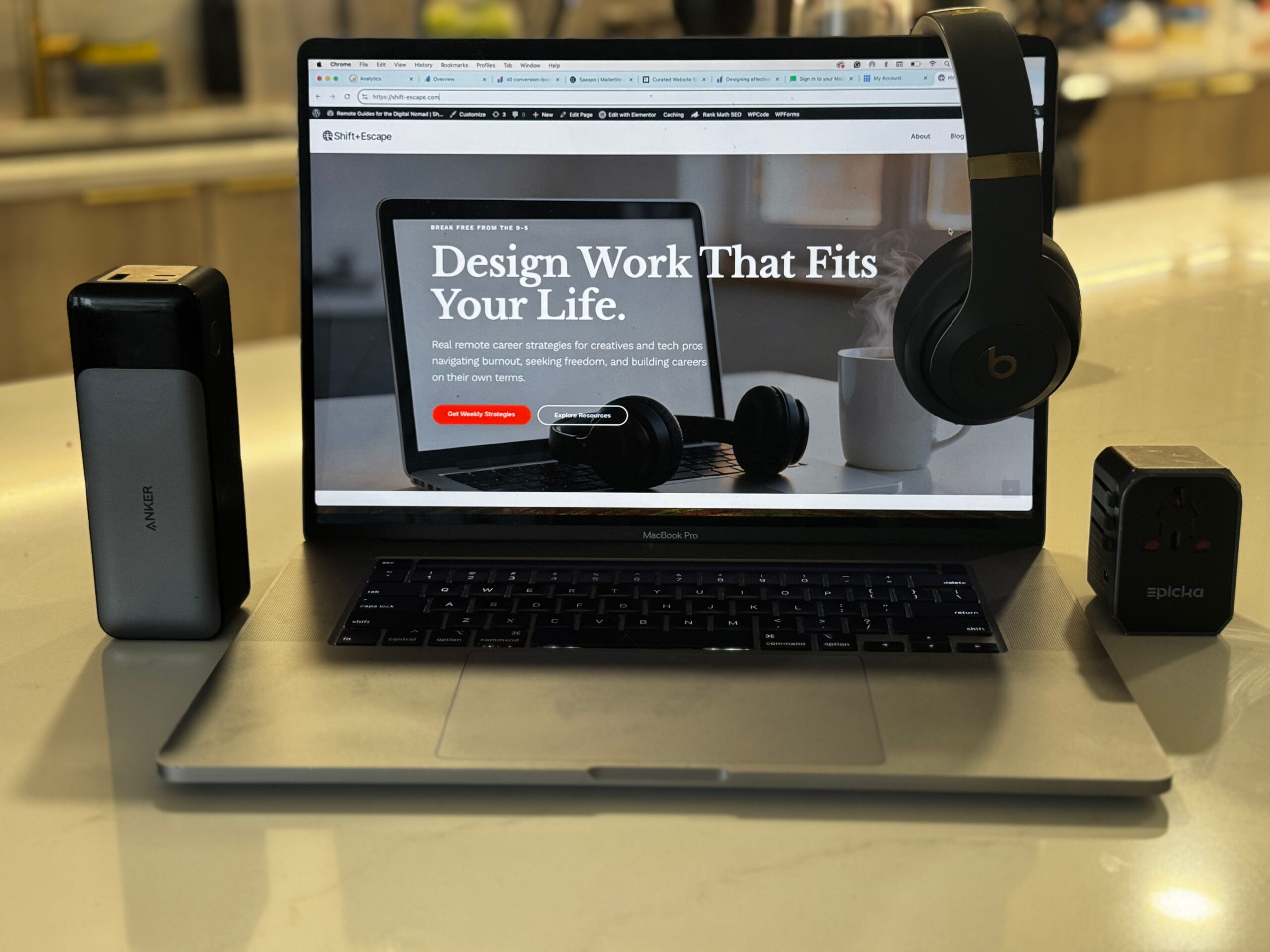
- The Core: Your laptop is the heart of your operation. This is not the place to cut corners. A powerful, reliable machine like a MacBook Pro is the industry standard for a reason. It’s your single most important investment. But if you’re a Windows person, that’s okay too, just use your favorite computer and don’t forget a laptop or bookbag that you can safely store your laptop. I chose the MacBook Pro because it the tool of the trade. As a UX designer I have been using MacBook since college. It’s lite weight, long battery life, and it was the main tool for Sketch when I was using it.
- Communication (Hardware): My single most important piece of communication hardware is a good pair of noise-canceling headphones with a quality microphone. My personal favorite is my Beats Pro headphones. I promise I’m not plugging Apple (even if they were paying me…they’re not), I have been using their products for years and I’m a creature of habit. My noise-canceling headphones allowed me to lead a seamless client presentation from a long train ride through Spain.
- The Ergonomic Essentials: Don’t sacrifice your body for the sake of portability.
- Portable Monitor: This is a complete game-changer for productivity. Having a second screen makes design work infinitely easier. Brands like ASUS ZenScreen make thin, light monitors that fit in your backpack. My portable monitor was a game-changer, allowing me to design complex work in a Porto hotel without sacrificing productivity. The price point and reviews were the biggest reasons for my choice.
- Ergonomic Mouse & Keyboard: A full-sized setup isn’t practical, but a travel-sized mouse like the Logitech MX Anywhere and a slim external keyboard will save your wrists. Now, I personally have the Ankler Ergonomic Optical Mouse and I love it! This was industry standard in the game of ergonomics. I read reviews and even reached out to friends who are tech gadget wizards.
- Laptop Stand: This is the most important ergonomic tool. A stand like the Roost or AOEVI elevates your screen to eye level, preventing the dreaded “laptop hunch.” My personal favorite is AOEVI! I love this stand and honestly brought it because it looked sleek, and it can rotate.
- Power & Peripherals:
- Universal Travel Adapter: Get one high-quality, all-in-one adapter that will work anywhere like the Ceptics Universal Travel Adapter. It’s my personal favorite. Being in Europe with the different outlets, I felt well prepared to get everything that I needed done. This was suggested to me by Amazon and to be honest…not a bad choice at all!
- Portable Power Bank: For long flights, train rides, or days when you’re working from a café with no open outlets, a good power bank is your safety net. Anker Power Banks are good investments. I saw the reviews and was sold.
Part 3: The Connectivity Toolkit (Staying Online)
Your internet connection is your lifeline. You can’t just hope for good Wi-Fi; you need a plan and a backup.
- Primary Connection: Before you book any accommodation, research the internet situation. Use sites like The Wired Nomad or Nomad List to check user-submitted Wi-Fi speed tests for your apartment or coworking space. Ask your Airbnb host for a speed test screenshot (they won’t always provide it, but it’s worth the ask).
- Backup Plan: The Wi-Fi will fail. It’s not a matter of if, but when.
- Local SIM Card: The first thing I do when I land in a new country is buy a local SIM card with a generous data plan.
- Phone Tethering: Your phone is your ultimate backup. Make sure you know how to use it as a portable hotspot. For travel between countries, an international data service like Google Fi or an eSIM provider like Holafly can be invaluable.
Part 4: The Logistics Toolkit (Managing Your Life)
These are the non-design tools that make the whole lifestyle possible and secure.
- Finance: Open a bank account with no foreign transaction fees. Charles Schwab is a popular choice in the US. I have one myself. Wise is another popular option, though I haven’t used it personally.
- Security: You will be using a lot of public Wi-Fi. A VPN (Virtual Private Network) is absolutely essential to protect your data from hackers. Don’t go for a free one; a paid subscription to a trusted provider like ExpressVPN or NordVPN (my personal favorite) is a small price to pay for peace of mind. My job gave me a massive discount…I couldn’t say no.
- Travel: Download Google Maps and save offline maps of your city so you can navigate without a connection. Google Translate (with offline language packs) is a lifesaver (in Mexico City, Google Translate helped me to speak with my taxi driver who gave me a tour), and a flight tracker like Skyscanner, Google Flights or Hopper will help you find your next destination.
After three years of testing, replacing, and refining, here’s exactly what my digital nomad tech stack costs. I’ve broken it down by category so you can prioritize based on your budget.
THE TOTAL INVESTMENT: BREAKING DOWN THE $5,000
Note: These are current figures; I paid differently when I originally bought.
HARDWARE (~$3,500):
– MacBook Pro (M1, 16″): $2,499
– ASUS ZenScreen Portable Monitor: $208
– Beats Pro Headphones: $349
– Ankler Ergonomic Mouse: $29
– Slim External Keyboard: $79
– AOEVI Laptop Stand: $49
– Ceptics Universal Adapter: $29
– Anker Power Bank: $ 94.99
SUBTOTAL HARDWARE: $3,337
SOFTWARE (Annual Subscriptions ~$980):
– Figma Professional: $144/year
– Adobe Creative Cloud: $779.88/year
– NordVPN: $60/year (Don’t forget my job gave me a discounted price)
SUBTOTAL SOFTWARE (YEAR 1): $983.88
CONNECTIVITY (~$720/year):
– International eSIM (Holafly): ~$50/month = $600/year
– Backup data plan: ~$10/month = $120/year
SUBTOTAL CONNECTIVITY: $720
TOTAL FIRST YEAR: $5040.88
ANNUAL RENEWAL (Software + Connectivity): ~$1,680
Worth every penny? Absolutely.
This digital nomad tech stack represents three years of trial and error. I’ve replaced, upgraded, and refined every piece based on real-world use across 10+ countries.
WHAT I DON’T RECOMMEND (Lessons Learned the Hard Way):
• Cheap Universal Adapters: Mine broke in Portugal, nearly fried my laptop. Spend the money on quality.
• Free VPNs: They sell your data. Not worth the “savings.”
• Oversized Luggage: Every extra pound matters when you’re moving between cities. I had to get rid of things when I went over. Stick to minimalist gear.
• Multiple Devices: I tried bringing an iPad + laptop. The iPad gathered dust. Choose one powerhouse device.
Conclusion: Minimal Gear, Maximum Freedom
The goal isn’t to carry more; it’s to carry smarter. Your digital nomad tech stack is what enables your freedom. With the right setup, you can work confidently from anywhere in the world. It’s the bridge between your professional life and your globetrotting adventures. With this setup, you can have confidence that no matter where you are in the world, you have everything you need to create, collaborate, and thrive. What’s the one non-negotiable item in your travel toolkit?
Ready to build your own remote work setup?
Every Tuesday, I send one email with practical strategies for working from anywhere—including the tools, gear, and systems that actually work.
Join my community and get the Real Talk on the remote packing guide. You can learn more about me here. Read my other posts here.